Self check-in kiosk and appointment board

Discover an efficient solution for managing walk-in clients at your barbershop. Utilize Barberly's Appointment Board and Self-Check-in Kiosk, enabling clients to select preferred times or join the queue effortlessly. The system displays waitlist positions on a monitor, ensuring a smooth and organized experience for all

Two Efficient Walk-in Solutions with Barberly

Choose Your Queue Option: Walk-in Appointments or Walk-in Queue and Waitlist

Barberly's self-check-in kiosk offers two efficient walk-in options for your barbershop

Walk-in appointments

Walk-in clients pick the next or later available time slot for today without the need to wait in line or interact directly with staff

Classic walk-in queue and waitlist

Instead of picking a specific time, walk-in clients simply check into the queue and receive a numbered ticket. Once checked in, clients wait for their turn to be called by the barber or administrator

Self check-in kiosk for your customers

Open the Barberly kiosk on an iOS or Android tablet and place it near your entrance or reception. Clients can check in on their own by selecting a service, choosing a preferred barber, and confirming their visit. All check-ins instantly appear in your schedule and appointment board, helping your team stay organized and reducing front-desk workload.
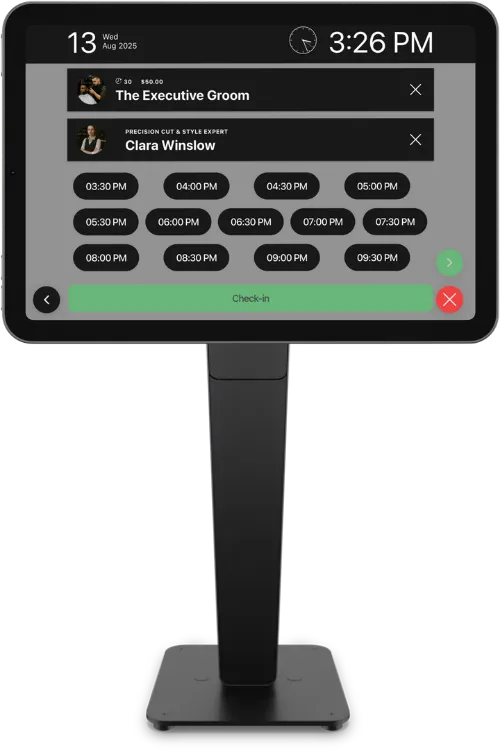
Self check-in kiosk for your customers

Turn any TV into a real-time appointment and queue board

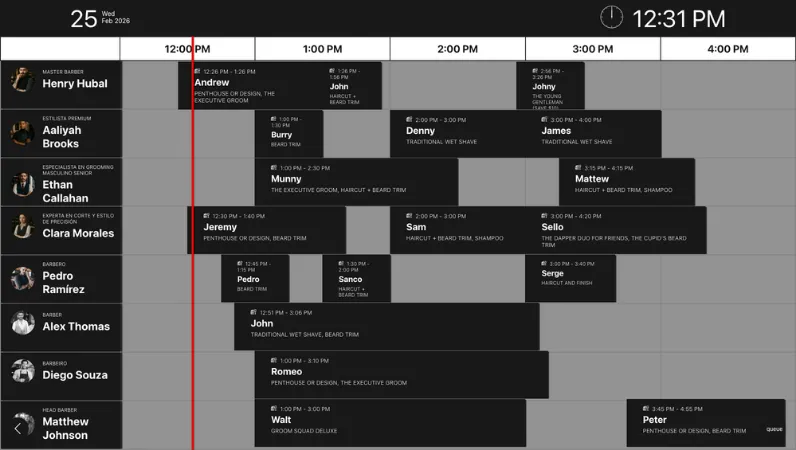
The Appointment Board displays everyone coming into the shop — walk-ins, online bookings, and clients who check in through your self-check-in kiosk — all in one clean timeline. Designed for barbershops, it helps reduce confusion, improve flow, and create a more professional in-shop experience

Barbershop appointment board on TV screen

What it shows

  • Live schedule with upcoming appointments
  • Electronic queue for walk-ins
  • Clients checked in via self check-in kiosk
  • Bookings made online or added by staff
  • Clear timeline view for the current working hours

Full control. Zero complexity.

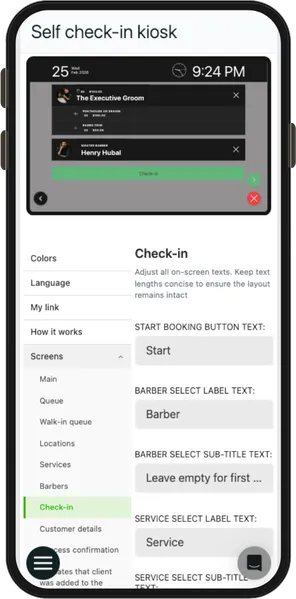
Barberly gives you one simple place to configure your live screens. Update design, structure, and content in seconds — whether you're on your phone, computer, or browser
Barbershop self check-in kiosk configuration on mobile
  • Configure from mobile, desktop, or web
  • Adjust colors, layout, and displayed data
  • Instant updates on kiosk and appointment board
  • Simple visual setup — no technical steps
  • Video and text tutorials included
Barbershop self check-in kiosk configuration on mobile

Frequently asked questions

Do you provide hardware for the kiosk or appointment board?

No. Barberly works with hardware you already have. The self check-in kiosk runs on any modern iOS or Android tablet, and the appointment board can be opened on any TV or screen with a browser.

Can clients pay through the self check-in kiosk?

No. The kiosk is for check-in only. Payments are handled during checkout using your normal Barberly POS and payment methods.

What devices can I use for the self check-in kiosk?

Any modern tablet works — iPad or Android. You simply open the kiosk mode and place the tablet where clients can access it.

How does the appointment board work?

Open it on a TV or large display and it shows upcoming appointments, queue status, and checked-in clients in real time.

Does it show both appointments and walk-ins?

Yes. The board combines online bookings, staff-created appointments, and walk-in check-ins into one live timeline.

Can I customize the design to match my barbershop?

Yes. You can change colors, layout, and branding directly from Barberly — no technical setup needed.

Can I manage settings from my phone?

Yes. Configuration is available from the Barberly mobile app, desktop app, and web version.

Do changes update instantly?

Yes. Any updates you make are applied immediately to the kiosk and appointment board.

Explore Barberly by features

It's free to try. We hope you do

Access all Barberly features completely free for 30 days.
Start Free Trial
No credit card required